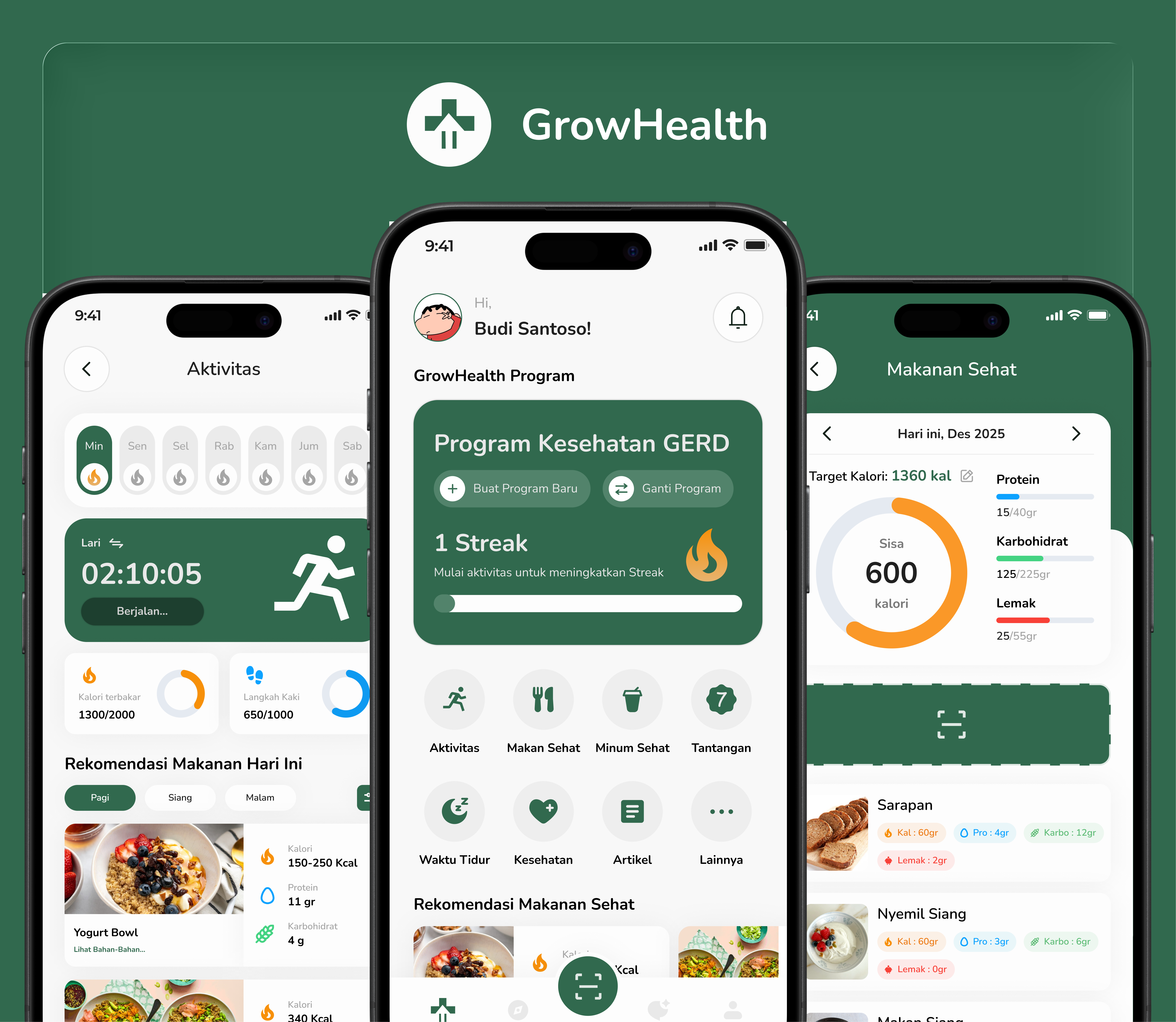
Nutritional health issues in Indonesia are still closely related to the public's lack of understanding of balanced diets and daily nutritional management, especially for those with certain health conditions. Amidst the rise in smartphone use, many available nutrition apps still focus on general calorie calculations and fail to address personal needs, the context of local food cultures, and provide accessible education for lay users. This gap presents an opportunity to design a more personalized and relevant nutrition mentoring app—not only helping users understand what they're eating, but also guiding them to develop sustainable healthy eating habits through contextual, educational, and actionable recommendations for everyday life.
Indonesians seeking to maintain or improve their health often struggle to consistently adopt healthy eating habits due to a lack of practical, personalized, and relevant nutritional insights. Current nutrition apps tend to provide general and technical information, such as calorie calculations, without considering individual health conditions, local dietary habits, and users' limited nutritional literacy. As a result, users feel confused, lack confidence in making food decisions, and fail to develop long-term healthy eating habits.
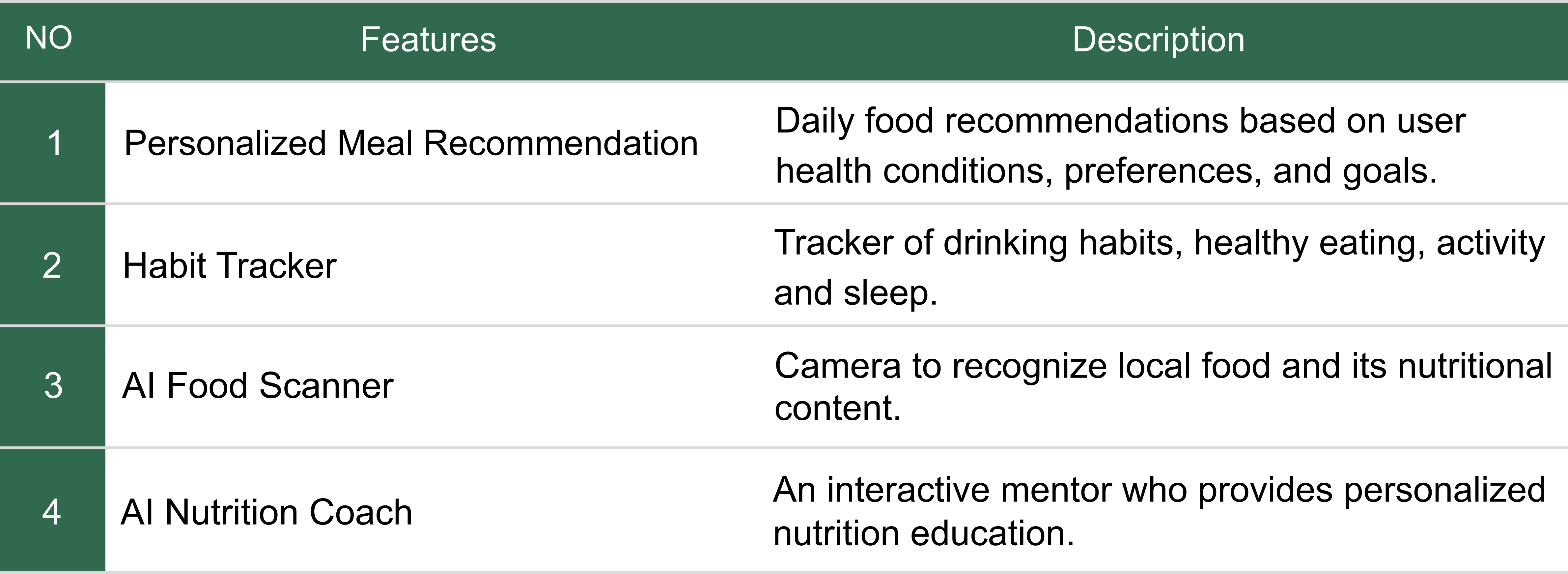
The proposed solution is a nutrition mentoring app focused on education and personalized support, helping users understand and implement healthy eating patterns tailored to their health and daily habits. The app not only presents nutritional data but also translates it into practical, easy-to-understand guidance through contextual food recommendations, visual portion sizes, and step-by-step instructions that support the development of sustainable healthy eating habits.
Research shows a strong opportunity to build digital diet products that can increase user adoption and retention through a more personalized and easy-to-understand mentoring approach. Approximately 70–80% of users prioritize practical dietary guidance and food recommendations over technical features like calorie calculations, while ±60–70% prefer a simple, cognitively less demanding experience. Furthermore, ±75% of users expect an inclusive experience for all levels of nutritional literacy, and ±80% value accessibility as an indicator of product quality. These findings indicate that products that simplify the complexity of nutrition, build trust through contextual recommendations, and support the gradual formation of healthy habits have greater potential to increase long-term engagement, reduce churn, and create significant differentiation in the health app market.
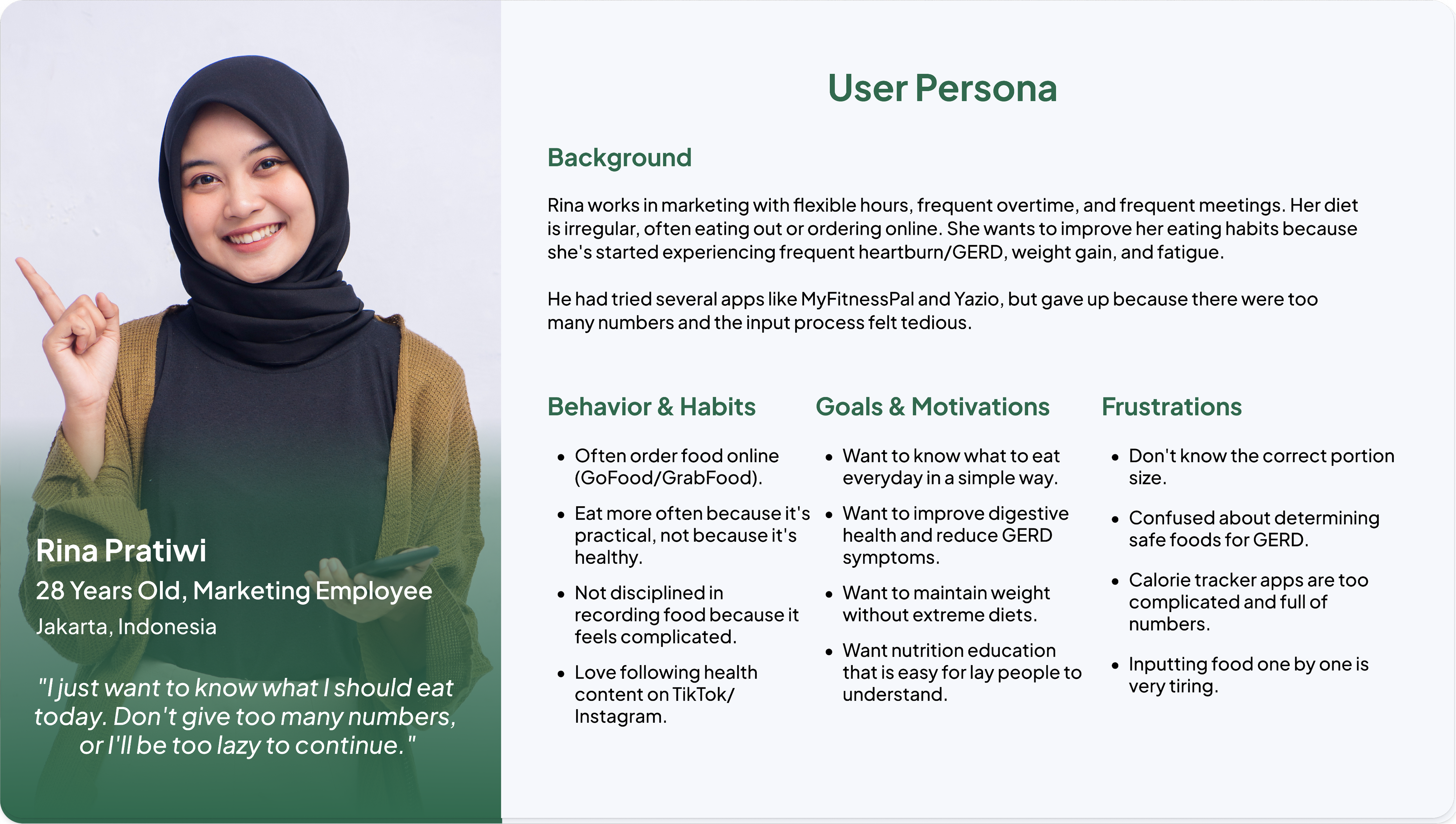
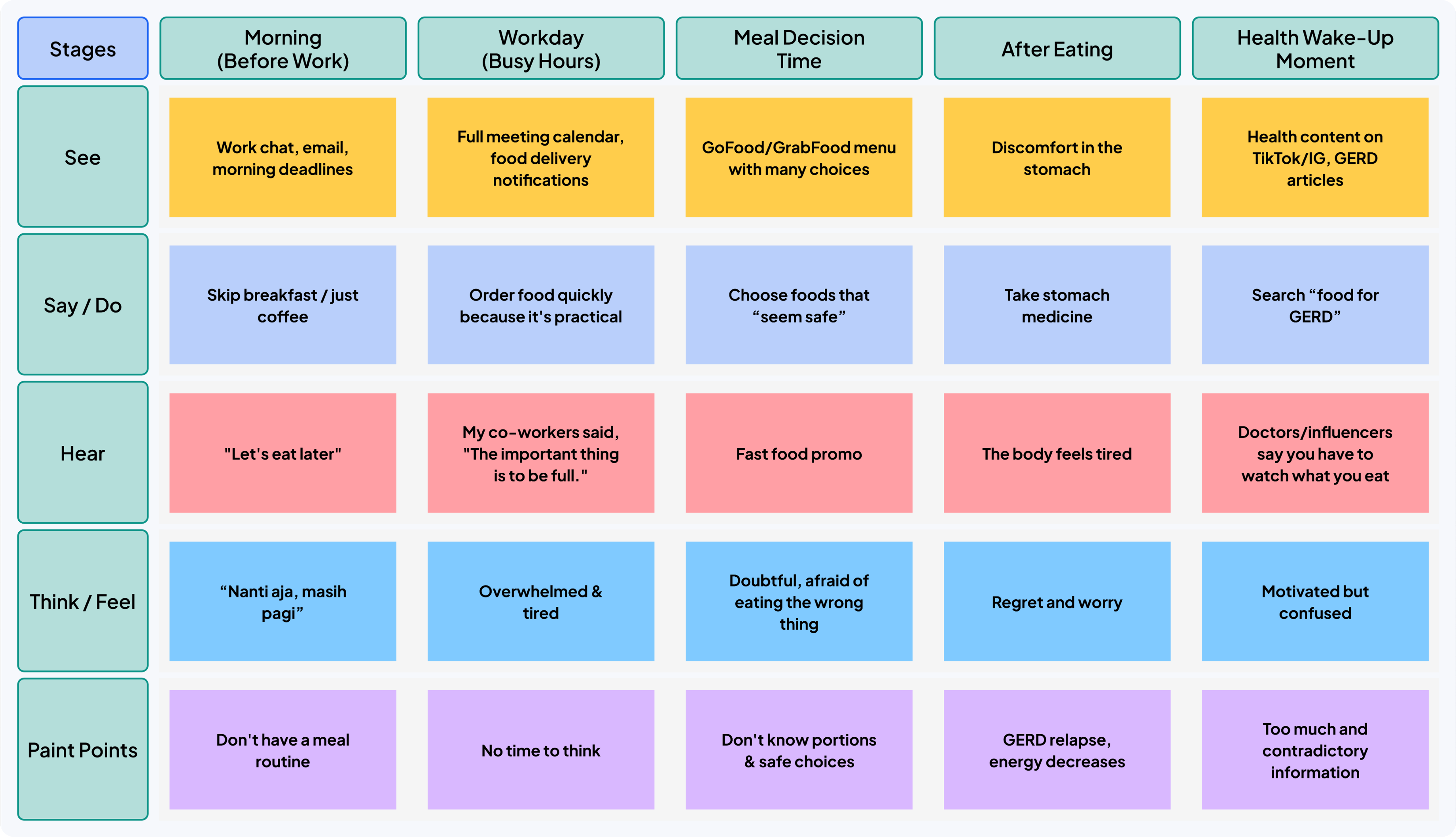
Rina represents a young urban professional with a flexible but irregular work schedule. Her busy work schedule, frequent overtime, and numerous meetings made her diet inconsistent, leading her to order food online more often for convenience, rather than health reasons. Over time, Rina began experiencing health issues such as GERD, weight gain, and fatigue, which sparked her need to improve her diet. However, her previous experience with diet apps frustrated her with too many numbers, tedious input, and technical-feeling information. Rina needed a simple and supportive solution—she wanted to know what to eat today, with easy-to-understand, visual guidance that didn't leave her feeling overwhelmed. This persona highlights the need for a UX experience that focuses on clarity, simplicity, and daily support for users with limited nutritional literacy but high motivation to change.
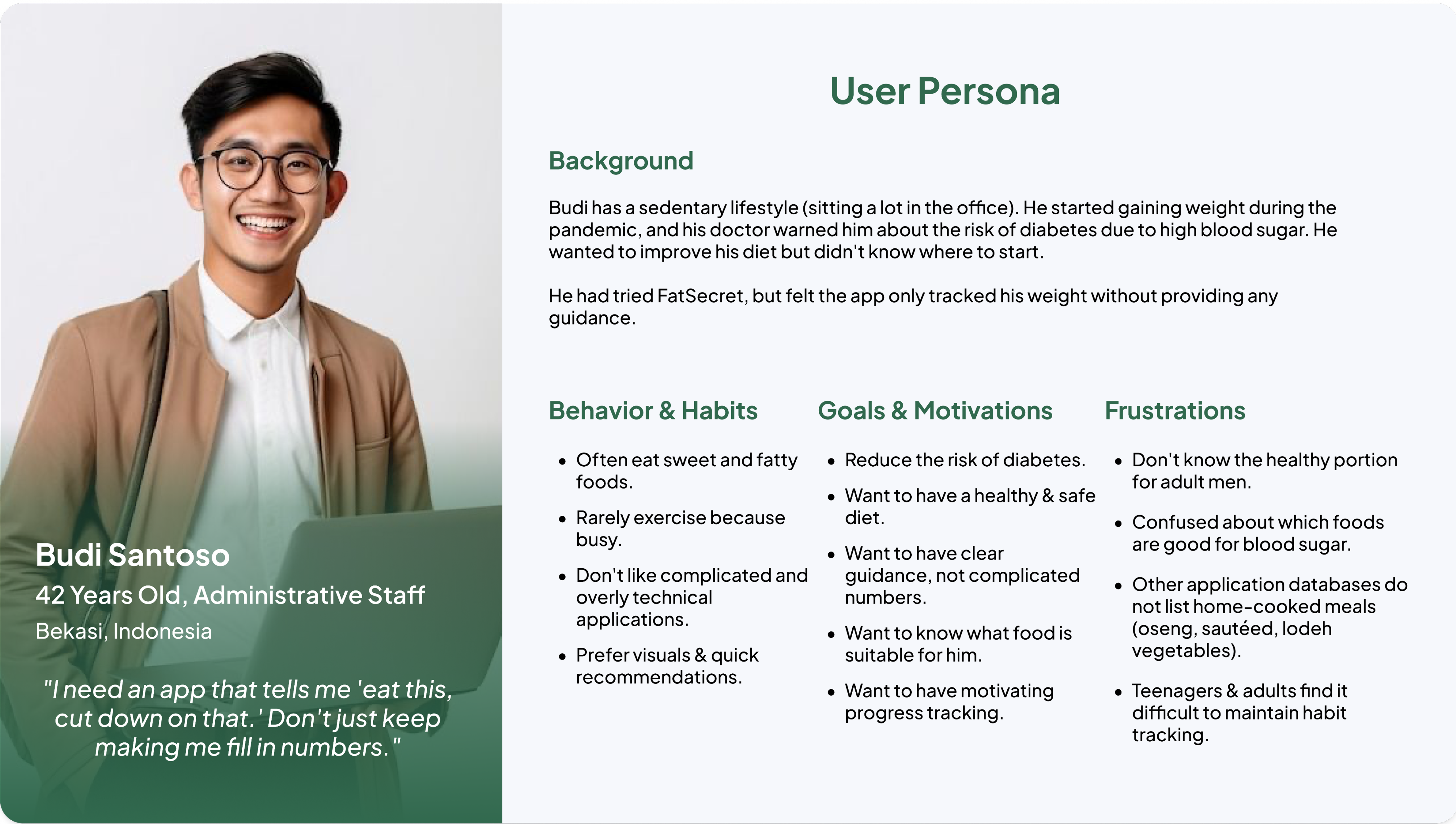
Budi represents an adult user with a sedentary lifestyle and long-term health risks. A sedentary work routine, minimal exercise, and a habit of consuming sugary and fatty foods led to weight gain, which eventually led to a medical warning about his risk of diabetes. Despite his strong desire to live a healthier life, Budi felt confused about where to start. His previous experience with diet apps focused solely on tracking weight without providing clear guidance, leaving him unmotivated. Budi needed clear yet simple guidance—food recommendations that align with his blood sugar levels, safe portion sizes, and motivating visuals and progress feedback. This persona emphasizes the importance of a UX that builds trust, reduces complexity, and provides actionable guidance for users with more serious health needs.
Rina represents a young urban professional with a flexible but irregular work schedule. Her busy work schedule, frequent overtime, and numerous meetings made her diet inconsistent, leading her to order food online more often for convenience, rather than health reasons. Over time, Rina began experiencing health issues such as GERD, weight gain, and fatigue, which sparked her need to improve her diet. However, her previous experience with diet apps frustrated her with too many numbers, tedious input, and technical-feeling information. Rina needed a simple and supportive solution—she wanted to know what to eat today, with easy-to-understand, visual guidance that didn't leave her feeling overwhelmed. This persona highlights the need for a UX experience that focuses on clarity, simplicity, and daily support for users with limited nutritional literacy but high motivation to change.
Budi represents an adult user with a sedentary lifestyle and long-term health risks. A sedentary work routine, minimal exercise, and a habit of consuming sugary and fatty foods led to weight gain, which eventually led to a medical warning about his risk of diabetes. Despite his strong desire to live a healthier life, Budi felt confused about where to start. His previous experience with diet apps focused solely on tracking weight without providing clear guidance, leaving him unmotivated. Budi needed clear yet simple guidance—food recommendations that align with his blood sugar levels, safe portion sizes, and motivating visuals and progress feedback. This persona emphasizes the importance of a UX that builds trust, reduces complexity, and provides actionable guidance for users with more serious health needs.
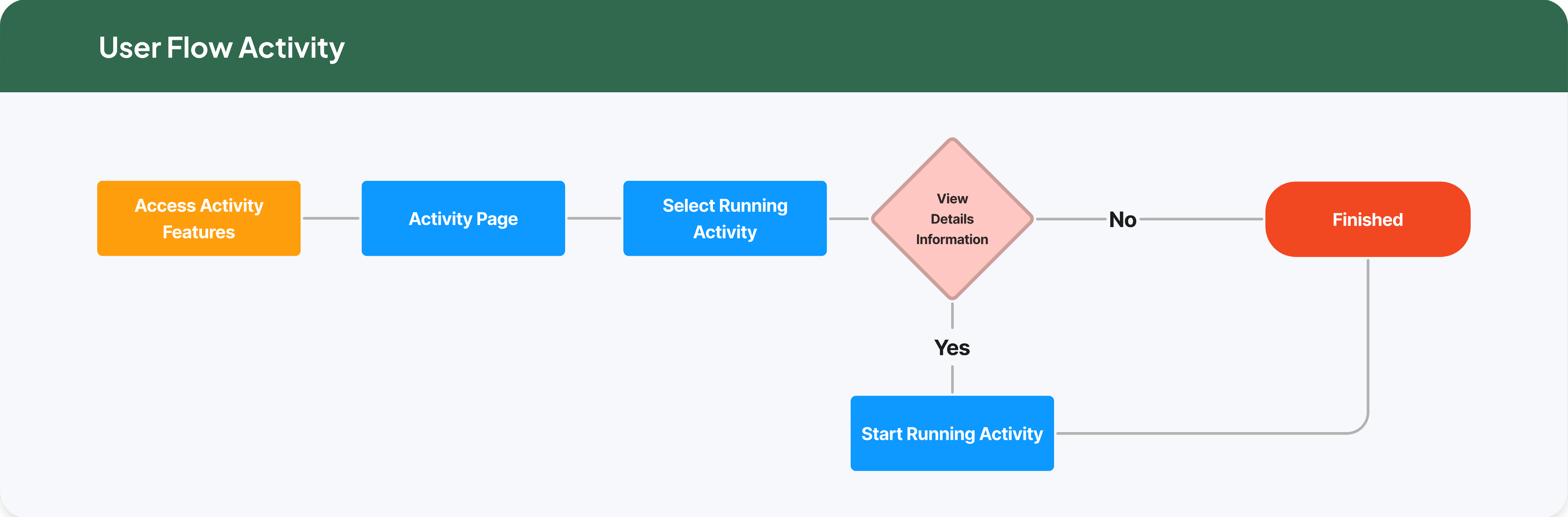
The journey begins when a user accesses the Activity feature. This is typically triggered by a simple intention, such as wanting to start moving, view workout options, or check out available activity features. The user enters the main activity page, which serves as an overview and orientation. This page introduces the types of activities available without pressure to start immediately. The user then selects Running as the activity they wish to engage in. This is the first point where they indicate a more specific intention. Before starting, the user is given the option to: View activity details (duration, benefits, estimated calories, etc.) Finish immediately without starting If the user does not want to view details, the flow ends without penalty. If the user chooses to view details, they can then start the running activity. The system facilitates the transition from intention to concrete action. The flow ends simply, whether the user starts the activity or not. There are no excessive pop-ups or guilt-driven messaging.
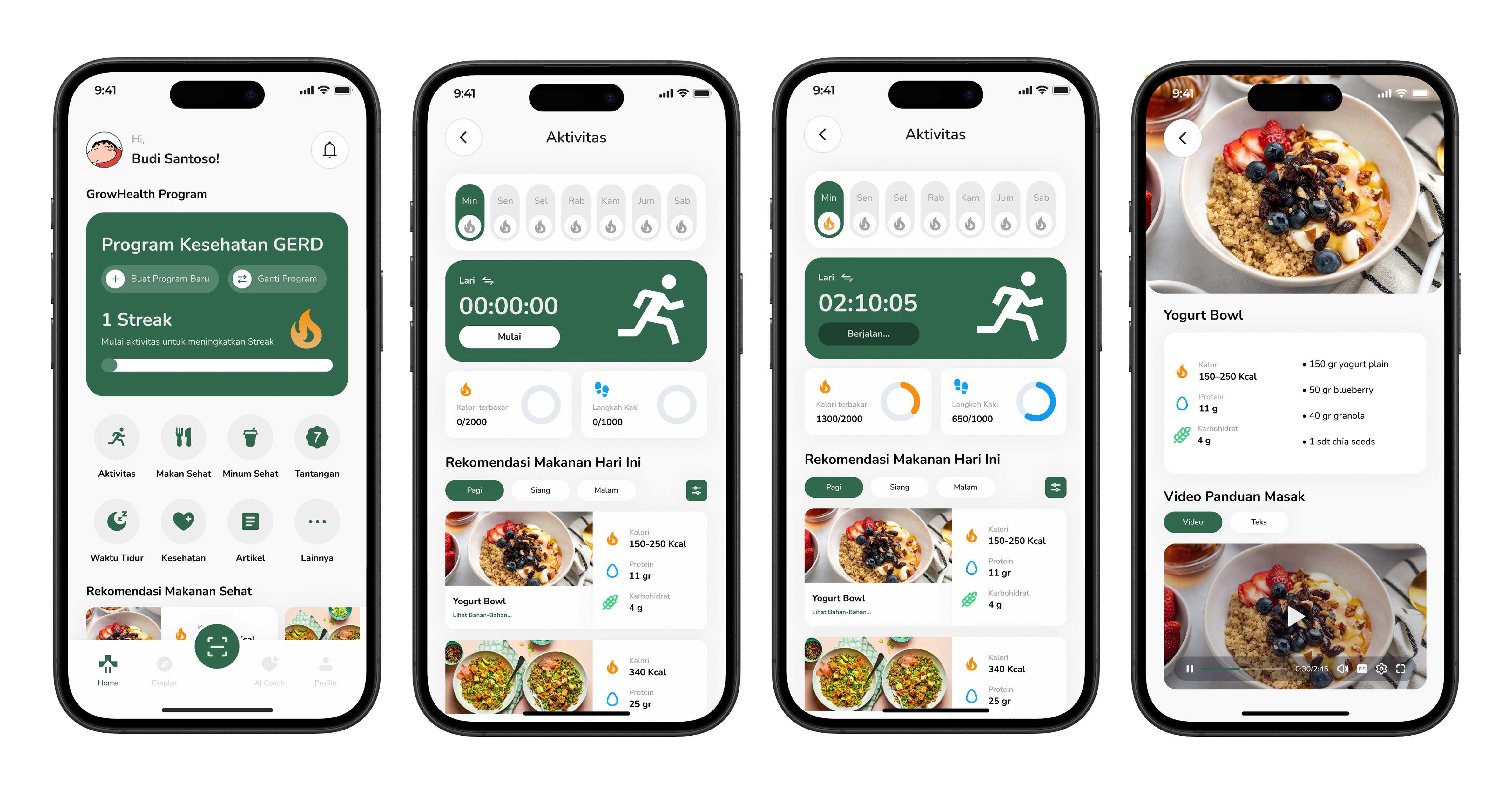
The journey begins when a user accesses the Activity feature. This is typically triggered by a simple intention, such as wanting to start moving, view workout options, or check out available activity features. The user enters the main activity page, which serves as an overview and orientation. This page introduces the types of activities available without pressure to start immediately. The user then selects Running as the activity they wish to engage in. This is the first point where they indicate a more specific intention. Before starting, the user is given the option to: View activity details (duration, benefits, estimated calories, etc.) Finish immediately without starting If the user does not want to view details, the flow ends without penalty. If the user chooses to view details, they can then start the running activity. The system facilitates the transition from intention to concrete action. The flow ends simply, whether the user starts the activity or not. There are no excessive pop-ups or guilt-driven messaging.
The journey begins when a user accesses the Activity feature. This is typically triggered by a simple intention, such as wanting to start moving, view workout options, or check out available activity features. The user enters the main activity page, which serves as an overview and orientation. This page introduces the types of activities available without pressure to start immediately. The user then selects Running as the activity they wish to engage in. This is the first point where they indicate a more specific intention. Before starting, the user is given the option to: View activity details (duration, benefits, estimated calories, etc.) Finish immediately without starting If the user does not want to view details, the flow ends without penalty. If the user chooses to view details, they can then start the running activity. The system facilitates the transition from intention to concrete action. The flow ends simply, whether the user starts the activity or not. There are no excessive pop-ups or guilt-driven messaging.
The journey begins when a user accesses the Activity feature. This is typically triggered by a simple intention, such as wanting to start moving, view workout options, or check out available activity features. The user enters the main activity page, which serves as an overview and orientation. This page introduces the types of activities available without pressure to start immediately. The user then selects Running as the activity they wish to engage in. This is the first point where they indicate a more specific intention. Before starting, the user is given the option to: View activity details (duration, benefits, estimated calories, etc.) Finish immediately without starting If the user does not want to view details, the flow ends without penalty. If the user chooses to view details, they can then start the running activity. The system facilitates the transition from intention to concrete action. The flow ends simply, whether the user starts the activity or not. There are no excessive pop-ups or guilt-driven messaging.